
Power up your logs ⚡️in Swift
From Random Noise to Bug-Slaying Superpowers
When something goes wrong in your app, the worst thing to see when debugging is random prints of error in the logs… and that’s it. No clue where it came from, no idea why it happened. Just the console equivalent of someone yelling “help!” from somewhere in the dark.
It’s time to fix that.
In this post, I’m going to show you how to make your logs so detailed and powerful that your future self will want to buy you coffee. ☕
(If you’re a video person, you can scroll down and watch the full walkthrough on YouTube. I’ve embedded it for you.)
Why Logs Are Like Breadcrumbs in the Debugging Dungeon
Think of logs as magical breadcrumbs you leave for yourself (and your fellow devs) when you need to track down bugs later.
If you drop just one crumb labeled “error”, you’re not finding your way back to the problem, you’re getting eaten by the bug dragon.
The trick is to make your logs detailed enough so you can see exactly what happened, where it happened, and in what order.

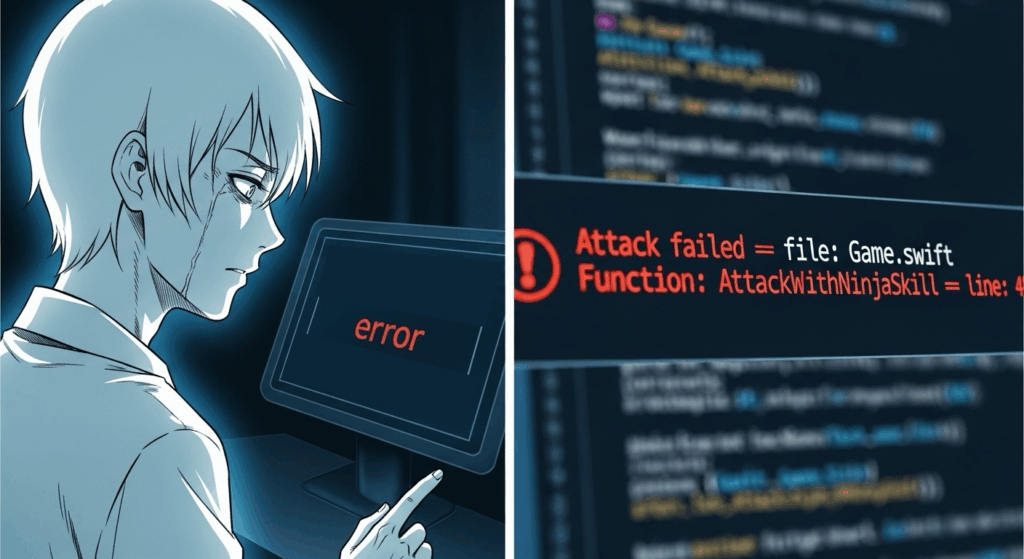
The Problem with Vague Logs
Here’s the deal… If your console just prints something like:
print("error")it’s basically useless.
When your app is running dozens of things at once, that single word tells you nothing about:
- Which part of your code failed
- What data caused it
- How it got there in the first place
We need context. And not just a little sprinkle. We need full-on “you are here” GPS-level detail.
Good Logs vs. Great Logs
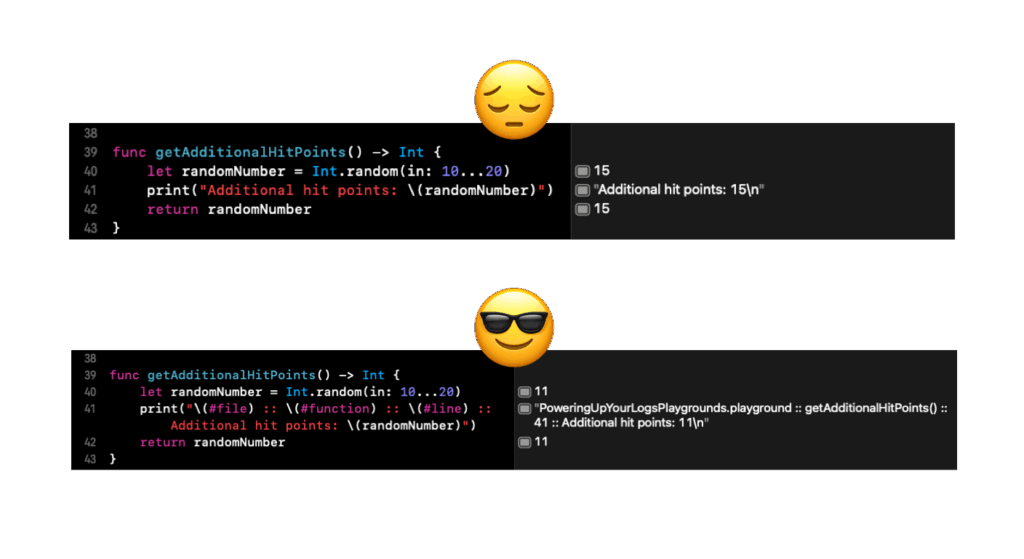
A good log might tell you:
print("Wizard recovered stamina: \(recovered)")
// Wizard recovered stamina: trueThat’s fine, it tells you what happened.
But a great log tells you:
print("Wizard recovered stamina: \(recovered) :: file: \(#file) :: function: \(#function) :: line: \(#line)")
// Wizard recovered stamina: true :: file: BattleManager.swift :: function: recoverStamina :: line: 87Now you know exactly where this happened in your code, making it 10x faster to debug.
The Three Magic Macros
Here’s my secret sauce: every print statement I write includes these three macros:
#file: The file name where the log happened#function: The function name where the log happened#line: The exact line number
print("Additional hit points: \(bonusHP) :: file: \(#file) :: function: \(#function) :: line: \(#line)")Do this, and suddenly your console becomes a detailed map of your app’s journey. Showing you the who, what, where, and when of every log.
Why This Matters in Real Apps
In a playground, this is already helpful.
But in a real app?
Game. Changer.
You’ll be able to:
- Spot race conditions instantly when a log fires earlier than expected
- Track down unexpected calls from other files
- Pinpoint the exact spot where something breaks without hunting through 500 lines of code
The result? Debugging becomes faster, clearer, and way less frustrating.
Pro Tips for Better Logging
- Keep logs verbose but meaningful. Print out relevant values and states, but don’t spam your console with noise
- Always think: “If this function broke, what would I need to know to fix it fast?”
- Use logs for more than errors. Track events, changes, and data flow so you can see the whole picture
Watch the Full Walkthrough
Want to see it in action? Here’s the full video where I walk through an example, step-by-step:
Final Thought
Logs aren’t just for catching errors, they’re your personal narrator, guiding you through the story of your app’s execution.
Add file, function, and line to your logs, and you’ll turn your console from a mysterious whisper into a crystal-clear bug radar.
Your future self will thank you. Your team will thank you. And the evil wizard in your code? Well… they won’t stand a chance. 🪄⚔️
Here is the full copy+paste ready code for playgrounds if you want to play with it:
import Foundation

var evilWizardStamina: Int = 100
let recoveryAmount: Int = 30

enum NinjaSkill {
    case stealth, shuriken, shadowClone
}

func attackWithNinjaSkill(_ skill: NinjaSkill) -> String {
    /*
     The macros added here are just to show you that anytime you print any text, you can use these Macros
     But you really wouldn't add them to the actual return statement. The real way to use these powerful macros
     is how we use them below when calling the attack() function and all the details print on the right, or at the bottom panel
     */
    let additionalHitPoints = getAdditionalHitPoints()
    switch skill {
    case .stealth:
        evilWizardStamina -= (10 + additionalHitPoints)
        return "\(#file) :: \(#function) :: \(#line) :: Stealth attack!\n"
    case .shuriken:
        evilWizardStamina -= (35 + additionalHitPoints)
        return "\(#file) :: \(#function) :: \(#line) :: Throwing shurikens!\n"
    case .shadowClone:
        evilWizardStamina -= (40 + additionalHitPoints)
        return "\(#file) :: \(#function) :: \(#line) :: Cloning myself!\n"
    }
}

func recoverStamina() {
    if Bool.random() == true {
        evilWizardStamina += recoveryAmount
        print("\(#file) :: \(#function) :: \(#line) :: Evil sorcerer recovered stamina!\n")
    } else {
        print("\(#file) :: \(#function) :: \(#line) :: Evil sorcerer could not recover\n")
    }
}

func getAdditionalHitPoints() -> Int {
    let randomNumber = Int.random(in: 10...20)
    print("\(#file) :: \(#function) :: \(#line) :: Additional hit points: \(randomNumber)\n")
    return randomNumber
}

/*
 If you look on the right side of every line being called inside this attack function
 you can see how powerful logs can be. We get to see exactly what file, function and line was running
 when we triggered our attack
 You can also see these logs below if you have the panel open
 */
func attack() {
    print(attackWithNinjaSkill(.shadowClone))
    recoverStamina()
    print(attackWithNinjaSkill(.shuriken))
    recoverStamina()
    print(attackWithNinjaSkill(.stealth))
    print("\(#file) :: \(#function) :: \(#line) :: Did we get the sorcerer out of the dungeon? \(evilWizardStamina <= 0)")
}

attack()
print("\(#file) :: \(#function) :: \(#line) :: Final sorcerer stamina: \(evilWizardStamina)")